Battery-powered stapler
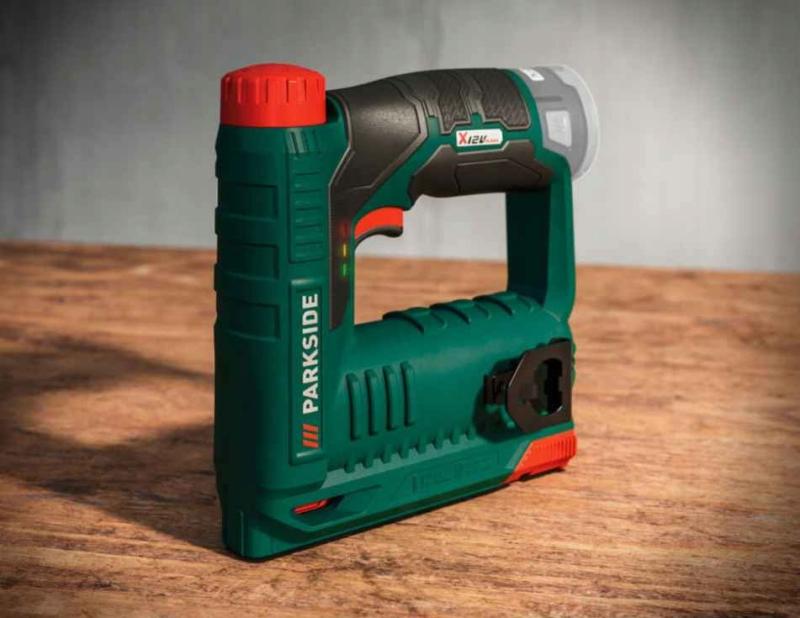
Get ready for work—you must wear:
- A work shirt and pants,
- Work shoes with composite toe caps,
- Work gloves,
- Safety glasses.

Before you start work, remember that you must:
- Complete health and safety training and on-the-job training.
- Have no health contraindications to performing the work.
- Be familiar with the operating instructions for the machines and equipment used at your workplace.
Before starting work with a stapler:
- Prepare auxiliary equipment for storing materials, instruments, tools, and waste.
- Put on the required personal protective equipment, including safety glasses.
- Plan the sequence of activities.
- Check the technical condition of the stapler, safety devices, and tightness of screws and nuts.
- Prepare workshop aids, measuring instruments, and work tools.
- Perform a test run and check that the stapler is working properly.
- Report any faults you notice immediately to your supervisor.
During work:
- Keep your workstation clean.
- Remember to wear the necessary personal protective equipment.
- Fold materials so that they do not pose a hazard.
- Use the size of staples recommended by the manufacturer.
- Protect the device from contact with liquids.
- Protect the battery from falls and impacts.
- Turn off the device if you notice any irregularities.
- Use the device for its intended purpose.
After finishing work:
- Turn off the stapler after finishing work.
- Remove the staples from the magazine and connect the battery for charging.
- Clean up the work area.
- Clean the device according to the manufacturer's instructions.
- Make sure that the device does not pose a hazard to the environment.
What should NOT be done?
- Allow unauthorized persons to work with the device.
- Press the trigger if the tool is not pointed toward the work surface.
- Repair the device yourself or perform other repair activities not recommended by the manufacturer.
- Remove the covers and safety devices from the stapler.
- Carry the stapler while it is connected (e.g., on a belt).
- Use the stapler in areas where there is a risk of explosion.
- Shoot staples into thin materials.
- Place your hands or other body parts under the staple firing area.
- Point the tool toward yourself or others.
Malfunction or accident?
- If something breaks, turn off the stapler, secure it against restarting, and report the malfunction to your supervisor.
- If an accident has occurred, do not touch anything and inform your supervisor.
- Hang a sign on the damaged stapler saying: "DEVICE UNDER REPAIR – DO NOT TURN ON."

Scan the QRcode
To view full content
Worth knowing more