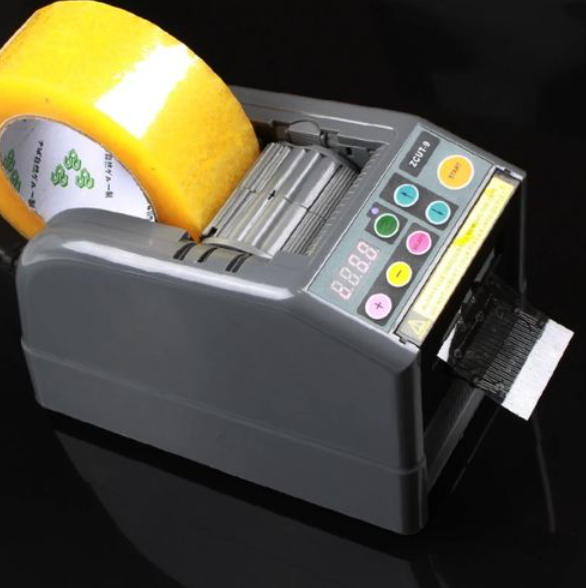
Electronic adhesive tape dispenser
Get ready for work—you must wear:
- A work shirt and pants,
- Work shoes with composite toe caps,
- Work gloves.

Before you start work, you must:
- Complete health and safety training and on-the-job training.
- Have no health contraindications to performing the work.
- Be familiar with the operating instructions for the machines and equipment used at your workplace.
Before starting work:
- Check the technical condition of the device and the power cable.
- Make sure that the device is connected to the power supply.
- Check the water level in the tank and top up if necessary.
- Check the condition of the tape and install a new one if necessary.
- Make sure that the safety mechanism is closed (without it, the device will not work).
- Perform a test run of the device.

During operation:
- Use the device for its intended purpose.
- Use tape with the dimensions specified in the user manual.
- Take the length of tape as needed.
- When replacing the tape, make sure that the heating elements have cooled down.
- Before replacing the tape or adding water, disconnect the device from the power supply.
After finishing work:
- Turn off the device.
- Check the condition of the water tank and adhesive tape, refill if necessary.
- Check that there are no foreign objects in the device.
What should you NOT do?
- Touch the heating elements of the device when they are hot.
- Remove foreign objects from the device while it is operating.
- Add water to the tank if the device is connected to the power supply.
- Use faulty devices.
- Move the device outside the designated area.
- Have repairs and modifications carried out by unauthorized persons.
Failure or accident?
- If something breaks down, turn it off and secure it against restarting, then report the fault to your supervisor.
- If an accident has occurred, do not move anything and inform your supervisor.
- In the event of an accident, provide first aid to the injured person and call emergency services if necessary.
- Hang a sign on the damaged device: "DEVICE UNDER REPAIR – DO NOT USE."

Scan the QRcode
To view full content
Worth knowing more