Tire balancer
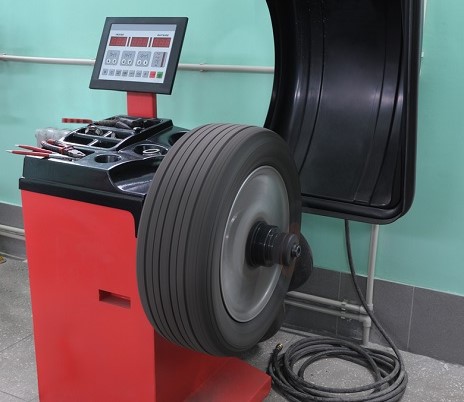
Get ready for work—you must wear:
- a work shirt and pants,
- work shoes with composite toe caps,
- safety glasses,
- work gloves.

Before you start work, you must:
- Complete health and safety training and on-the-job training.
- Have no health contraindications to performing the work.
- Be familiar with the operating instructions for the machines and equipment used at your workplace.
Before starting work:
- Check the technical condition of the equipment.
- Check the operation of the main and emergency switches.
- Make sure that all guards are in place.
- Check that the sliding parts are lubricated.
- Check that there are no bystanders near the machine.
- If an extension cord is necessary, make sure it meets the manufacturer's standards and is not located in a place where it could be damaged.
- Make sure that there are no objects near the machine that could cause damage (loose objects, hanging clothing, etc.).
- Before starting the balancing process, make sure that the wheel is properly mounted.
- If you have long hair, tie it back in a braid or bun, or wear a protective net.

When working with the balancing machine:
- In the event of a power failure, immediately turn off the main switch.
- Do not place any objects on the device while it is in operation.
- Do not approach moving parts of the device while it is in operation.
- Use the required personal protective equipment.
- Do not allow unauthorized persons to operate the device.
- If the device is not in operation, disconnect it from the power supply.
- Keep the device, its accessories, and warning signs clean and in good working order.
- Do not operate the device near containers with gases or flammable substances.
- To start the spindle, close the cover and start the machine with the green button.
Warning! The machine may start automatically when the cover is lowered! - Avoid looking directly at the laser beam.
- Use the device for its intended purpose.
- Remember to clean and lubricate the spindle thread.
When working with the touch screen:
- Keep the monitor away from heat sources.
- Maintain good ventilation and do not cover the ventilation openings.
- The monitor surface is susceptible to damage, do not touch it with hard objects.
- Clean the monitor with window or glass cleaner, but do not spray the liquid directly onto the screen.
- Clean the screen regularly to ensure good visibility.
When you have finished working:
- Turn off the power to the device.
- Tidy up your workstation.
- Remove stubborn stains using mild cleaning agents.
- Use lubricants containing a Teflon coating for lubrication.
What NOT to do?
- Work with the covers removed.
- Work with damaged equipment.
- Use inappropriate tools.
- Leave the device unattended while it is operating.
- Have unauthorized persons perform repair work.
- Operate equipment without personal protective equipment.
- Use the machine near containers with flammable gases or liquids.
- Wear loose clothing, rings, loose hair, and other jewelry while working.
- Put your hands into moving parts of the device.
- Stand on the device.
- Look under the covers of the device while it is operating.
- Use any objects to amplify the laser power.
- Operate a laser that has a damaged seal/cover.


Failure or accident?
- If something breaks down, turn off the tire balancer motor, secure it against restarting, and report the malfunction to your supervisor.
- If an accident has occurred, do not move anything and inform your supervisor.
- Hang a sign on the damaged device: "DEVICE UNDER REPAIR - DO NOT USE."
- If you detect a hazard, immediately shut down the device using the emergency switch or emergency stop cord.

Scan the QR code
And see full content
Worth knowing more