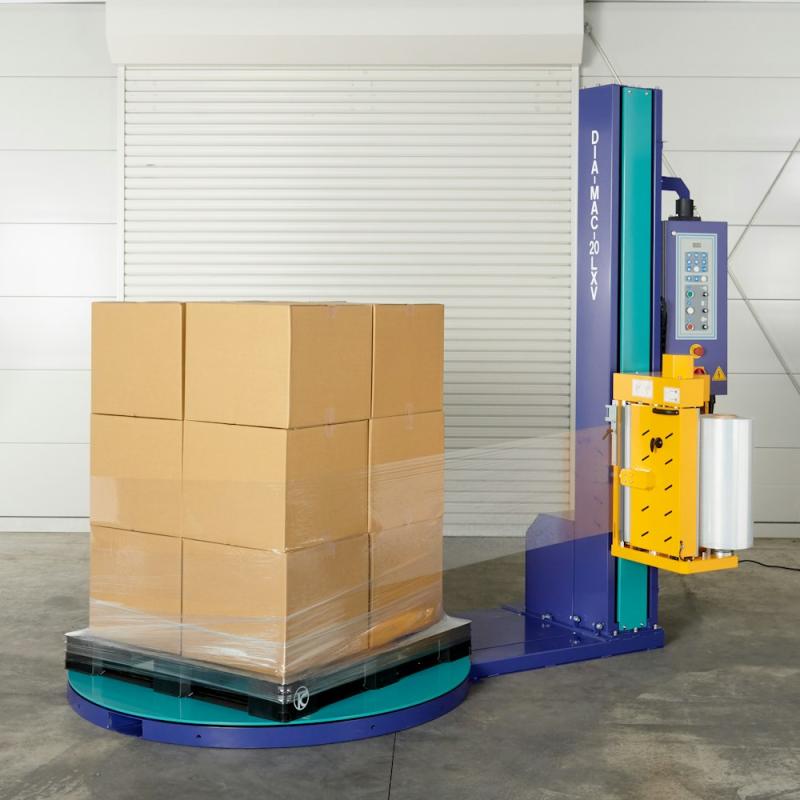
Wrapping machine
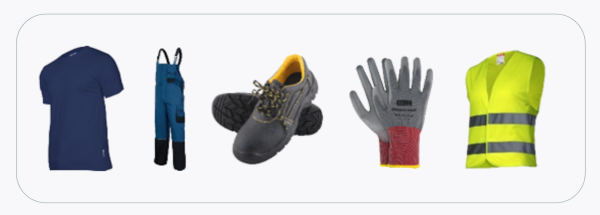
Get ready for work—you must wear:
- a work shirt and pants,
- work shoes with composite toe caps,
- a reflective vest,
- work gloves.
Before you start work, you must:
- Complete health and safety training and on-the-job training,
- Have no health contraindications to performing the work,
- Be familiar with the operating instructions for the machines and equipment used at your workplace.

Before starting work:
- Make sure that the condition of the equipment does not pose a hazard during operation.
- Secure the elements of the workstation so that they are not damaged.
- Remove all unnecessary items from the workplace.
- Check that the protection against crushing with the film trolley is working properly:
- When the film carriage is moving downwards, hold the safety device with your hand (the carriage must stop).
During operation:
- Fold the materials used during work so that they do not pose a hazard.
- If you need to leave your workstation, turn off the wrapper and all devices that may cause a hazard.
- Do not touch any moving parts of the machine while the wrapper is in operation.
- Keep your workstation tidy.
After finishing work:
- Turn off the machine.
- Clean up your workstation.
- When cleaning the machine, remember to disconnect it from the power supply.
- Perform a visual inspection for technical faults.
- If you notice any technical faults in the machine, report them to your immediate supervisor.
What should NOT be done?
- Allow unauthorized persons to work on the machine.
- Leave the workplace while the machine is in operation.
- Climb onto the wrapper platform while it is in operation.
- Repair or maintain the machine if you are not an authorized person.
- Remove covers and housings from electrical connections while the machine is in operation.
- Wash equipment under running water.
Malfunction or accident?
- If something breaks down, disconnect the device from the power supply and report the fault to your supervisor.
- If an accident has occurred, do not move anything and inform your supervisor.
- In the event of an accident, immediately administer first aid to the injured person and call the emergency services if necessary.
- Hang a sign on the damaged device: "DEVICE UNDER REPAIR – DO NOT TURN ON."

Scan the QRcode
To view full content
Worth knowing more