Ergonomics of working at a computer
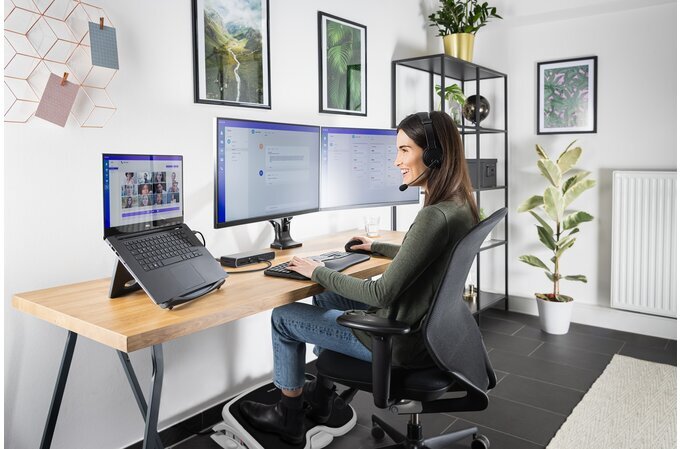
Before you start working, remember that:
OFFICE:
- all the devices you use for work, such as your keyboard and mouse, should be within easy reach,
- if you have to stretch your arm far to reach the mouse or type something on the keyboard, you will very quickly begin to feel the negative consequences,
- the distance between the edge of the desk and the keyboard should be greater than 10 cm, so that you can rest your hand on the desk instead of holding it without support.

MONITOR:
- The monitor should be positioned so that the light source, i.e., a window or lamp, is not behind it.
- the top edge of the monitor should be positioned slightly below eye level, and the center of the screen should be at eye level,
- distance between the eyes and the screen: 40-75 cm,
- windows should be equipped with blinds or shutters, and when working after dark or on cloudy days, the computer screen light should not be the only source of light.

CHAIR:
- adjustable armrests, height, ability to rotate around its axis,
- size should ensure comfortable sitting and a relaxed posture,
- the seat and backrest should be contoured to the natural curvature of the spine,
- armrests and a stable base with 5 supports.

ROOM:
- temperature: 21–23°C (min. 18°C),
- humidity: min. 40%,
- frequently ventilated; it is good if there are plants in the room.
- armrests and a stable base with 5 supports.
Rules for working at a computer:
- Look at a distant point for a few seconds every 10 minutes.
- Take short breaks every hour - 5 minutes.
- Clean the screen with a dry, antistatic cloth.
- The monitor should have an anti-glare coating or filter.
If the chair is too high:
- Use a footrest so that your feet rest flat on the floor.
What not to do:
- eat or smoke at your workstation,
- repair equipment yourself or clean it with water,
- use solvents for cleaning,
- blocking equipment ventilation openings,
- use damaged or malfunctioning equipment,
- store magnets, magnetic jewelry, or flammable liquids at your workstation.
Remember, your workstation should be:
- safe,
- ergonomic,
- clean, and tidy.
Take care of yourself—change positions, take breaks, and use equipment as intended.
Breakdown or accident:
- If something breaks, notify your supervisor immediately.
- If an accident has occurred, do not move anything and also inform your supervisor.


Scan the QRcode
To view full content
Worth knowing more